
Have you published a website or blog but still cannot find it on Google? A website not ranking on Google can be frustrating, especially when you have invested time in creating content and building your online presence. Several issues can affect search visibility, including indexing problems, keyword selection, technical SEO errors, weak content, and poor internal linking.
The good news is that you can investigate these issues using Google Search Console and practical search engine optimization techniques. This guide explains the common reasons your website may not appear in search results and how to address them step by step.
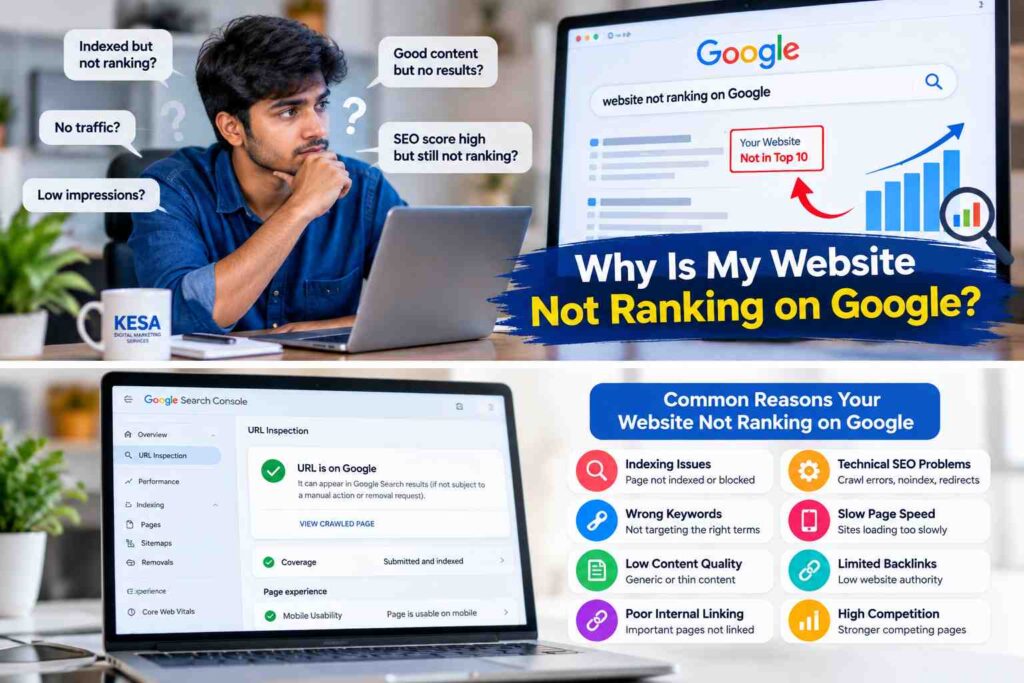
Why Is Your Website Not Ranking on Google?
Your website may not rank because Google has not indexed the page, your content does not match the user’s search intent, or competing pages provide more useful information. Technical problems and limited website authority can also affect performance.
First, identify whether your page is missing from Google entirely or appearing at a lower position than expected. These are different problems and require different solutions.
1. Check Whether Your Website Is Indexed by Google
Indexing is an important part of SEO. Google discovers pages through crawling, processes their content, and may add eligible pages to its index. A page that is not indexed generally cannot appear in ordinary Google Search results.
Open Google Search Console and use the URL Inspection tool to check your page. Review the indexing status and any reported issues. If the page is eligible for indexing but has not been indexed, Website not ranking on Google SEO analysis you can request indexing after checking that the content is accessible and useful.
Also review your XML sitemap, robots.txt file, and any accidental noindex directives. Submitting a sitemap or requesting indexing does not guarantee that Google will index the page.
2. Target the Right Keywords
Choosing the wrong keywords can make it difficult to attract relevant visitors. Your content should match the phrases your intended audience actually uses when searching online.
For example, a business serving local customers may target a phrase such as “digital marketing services in Guntur” rather than relying only on a broad term such as “digital marketing.”
Use keyword research to understand search intent, competition, and related questions. Include your primary keyword naturally in the page title, main heading, introduction, and relevant subheadings. Learn how SEO works to understand how search engines discover, index, and rank pages.
Avoid repeating the same keyword excessively. Write naturally and cover the topic thoroughly instead of trying to achieve an arbitrary keyword density.
3. Improve Technical SEO Website not ranking on Google SEO analysis
Technical SEO helps search engines access, understand, and process your website. Even useful content can face visibility problems when important technical settings are incorrect.
Review the following areas during your website SEO audit:
- Crawlability: Make sure search engines can access important pages.
- Indexing directives: Check for unintended noindex tags and incorrect canonical URLs.
- Sitemap: Include the important, canonical URLs you want search engines to discover.
- Page speed: Reduce unnecessary scripts, optimize images, and improve loading performance.
- Mobile usability: Make sure text, buttons, navigation, and page layouts work well on mobile devices.
- HTTPS: Use a secure connection across your website.
Fix the issues that affect your important pages first. Technical improvements can remove obstacles, but they do not guarantee higher rankings on their own.
4. Create Helpful and Original Content
Content quality plays an important role in SEO. If your article provides only a brief or generic explanation, readers may not find enough information to solve their problems.
Create content that answers the main question clearly and provides practical steps, relevant examples, and useful explanations. Use your own analysis and experience wherever possible.
For example, instead of simply stating that keyword research is important, explain how a business owner can compare search terms, identify user intent, and select an appropriate keyword for a service page.
Avoid copying competitor articles or rewriting existing content without adding value. Originality means contributing useful information, not merely changing a few words from another source.
5. Understand Search Intent
Search intent is the reason behind a search query. Someone searching for “what is SEO” generally wants an explanation, while someone searching for “SEO services in Guntur” may be looking for a service provider.
Your page should satisfy the purpose behind the keyword.
Before publishing, review the types of pages appearing for your target query. Determine whether searchers expect a tutorial, comparison, local service page, or product page. Then create content that meets that need more effectively.
Do not copy competing pages. Use your research to understand the topic and provide a distinct, helpful answer.
6. Improve Internal Linking
Internal links connect one page on your website to another. They help visitors discover related content and help search engines understand how your pages relate to each other.
For example, if you have published a beginner’s guide titled “What Is SEO?”, you can link to it from a related article about website ranking problems.
You can also connect relevant blog posts to your service pages where the link genuinely helps readers.
Use descriptive anchor text that explains what the destination page covers. Avoid adding irrelevant links or forcing the same keyword into every anchor text.
7. Build Relevant Backlinks Naturally
Backlinks are links from other websites to your pages. Relevant, editorially earned links can help people discover your content and provide useful context about your website.
Focus on creating resources that other website owners may want to reference. You can also contribute useful guest articles, participate in relevant professional communities, and build relationships within your industry.
Avoid buying large numbers of low-quality links or creating repetitive links solely to manipulate rankings. Prioritize relevance, editorial quality, and genuine value.
8. Optimize Your Website for Mobile Devices
Many people browse websites using smartphones. If your website is difficult to read or navigate on a mobile screen, visitors may struggle to use it.
Test your important pages on different screen sizes. Check whether headings wrap properly, buttons are easy to tap, images fit the screen, and navigation works correctly.
Also review loading performance and layout stability. Google’s Core Web Vitals include Largest Contentful Paint (LCP), Interaction to Next Paint (INP), and Cumulative Layout Shift (CLS).
Improving these areas supports a better user experience, although good performance metrics alone do not guarantee top search positions.
9. Check Your Website’s Google Search Console Performance
Google Search Console helps you understand how your website performs in Google Search. Review the Performance report to examine impressions, clicks, click-through rate, and average position. For more details about monitoring your website’s search performance, visit the official Google Search Console guide.
Use the Page Indexing report and URL Inspection tool to investigate indexing issues. Remember that a page can be indexed without receiving meaningful impressions, and an indexed page may still rank poorly for competitive searches.
Compare performance over an appropriate period before deciding whether your SEO changes are working.
10. Give New Content Time to Perform
New pages do not always appear immediately or achieve strong positions as soon as they are published. Search engines need to discover and process pages, and ranking systems must determine which results are most relevant to each query.
Check indexing first, then monitor search performance over time. Update content when you identify missing information, outdated details, technical problems, or a mismatch with search intent.
Do not repeatedly change titles or rewrite entire pages without understanding the underlying issue. Make meaningful improvements and evaluate the results.
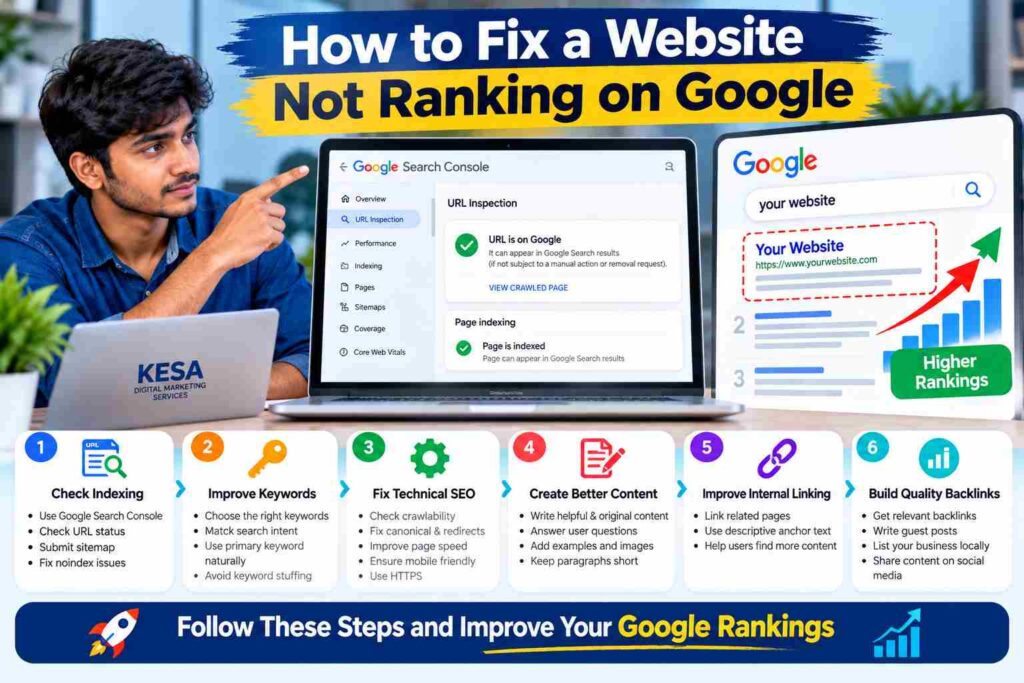
How to Fix a Website Not Ranking on Google
Follow this practical checklist to identify and address common SEO problems.
- Open Google Search Console and inspect the affected URL.
- Confirm whether the page is indexed or has an indexing issue.
- Review the title tag, H1 heading, meta description, and target keyword.
- Compare the content with the search intent behind your target query.
- Check technical SEO, canonical tags, mobile usability, and page speed.
- Add relevant internal links from existing pages.
- Improve the content with original information and useful examples.
- Monitor impressions, clicks, and average position in Search Console.
Start with the issue most likely to affect your page. There is no need to change every SEO element at once.
Frequently Asked Questions
How long does it take for a website to rank on Google?
There is no fixed timeline. Results depend on factors such as competition, content quality, website accessibility, indexing, and the query being targeted. Some pages gain visibility relatively quickly, while others may take much longer.
Why is my website indexed but not ranking?
Indexing only means Google has included a page in its index. It does not guarantee that the page will rank prominently. Review your content quality, keyword relevance, search intent, competition, and technical SEO.
Does publishing more blogs improve Google rankings?
Publishing more articles does not automatically improve rankings. Focus on creating useful, original content that serves your audience. A smaller collection of strong, relevant articles can be more valuable than a large number of repetitive posts.
Can SEO services help improve website rankings?
Professional SEO services can help identify technical problems, improve content strategy, research keywords, strengthen internal linking, and monitor search performance. However, no SEO provider can honestly guarantee a specific Google position.
Conclusion
If your website is not ranking on Google, begin by checking indexing status, keyword relevance, technical SEO, content quality, and internal links. Use Google Search Console to identify problems and measure progress instead of making changes based on assumptions.
SEO is an ongoing process that requires useful content, sound technical practices, and regular evaluation. By addressing the most important issues first, you can improve your website’s ability to appear for relevant searches and attract the right audience.
If you need help identifying SEO issues on your website, explore our SEO services or contact KESA Digital Marketing Services to discuss your website’s goals.
Why Is Your Website Not Ranking on Google Despite Good Content?
If your website not ranking on Google is a concern, check whether your content matches search intent and answers users’ questions. Even well-written articles may struggle when keyword competition is high, indexing issues remain, or the page lacks useful information. Review your content and identify specific areas that need improvement.
How Can You Fix a Website Not Ranking on Google?
To fix a website not ranking on Google, start by checking your page in Google Search Console. Review indexing status, keyword relevance, technical SEO errors, and internal links. Improve content quality, address confirmed problems, and monitor impressions and clicks to evaluate progress.
What Should You Do When Your Website Is Not Ranking on Google?
When your website is not ranking on Google, avoid changing every SEO setting at once. Identify the main problem, improve the affected page, and monitor its performance over time. Use relevant keywords naturally and create useful content that helps readers solve their problems.
If your website not ranking on Google is affecting your organic traffic, review your content strategy before making major changes. Check Google Search Console for indexing problems, improve keyword relevance, fix technical SEO errors, and create helpful content that answers your audience’s questions.