
SEO vs Google Ads: Which Is Better for Your Business?
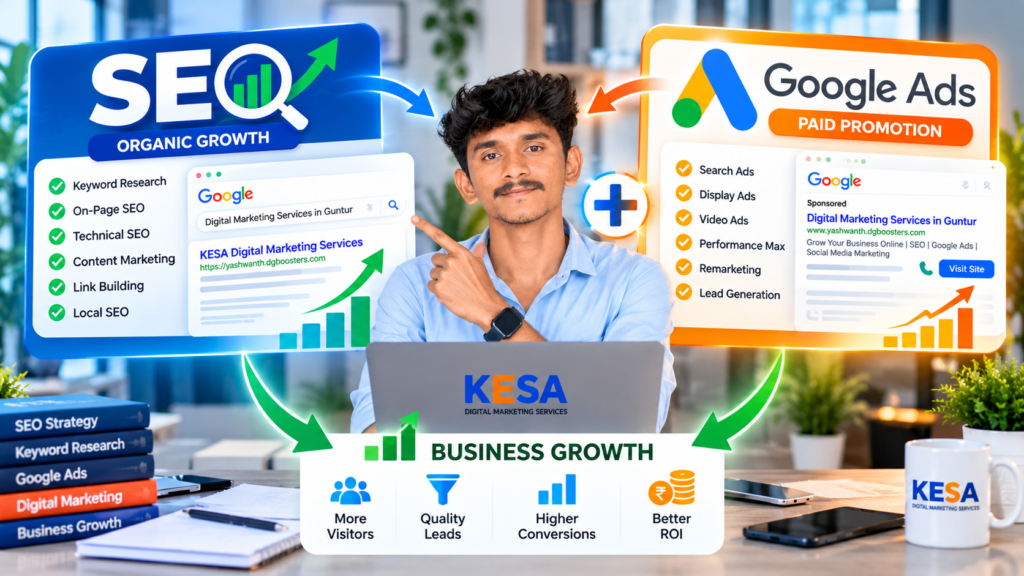
Are you confused about SEO vs Google Ads and wondering which digital marketing strategy can help your business attract more customers? Both strategies help businesses increase online visibility, reach potential customers and generate leads. However, they work differently and offer different advantages. Search Engine Optimization (SEO) helps your website appear in Google’s organic search results, while Google Ads allows you to promote your products and services through paid advertisements. In this guide, we will explain SEO vs Google Ads, compare their costs, benefits and results, and help you choose the right strategy for your business. What Is SEO and How Does It Work? Search Engine Optimization (SEO) is the process of improving a website to increase its visibility in organic search engine results. When potential customers search for products or services related to your business, SEO helps your website appear for relevant search queries. For example, if someone searches for “Digital Marketing Services in Guntur”, an SEO-optimized website may appear in Google’s organic search results. Important SEO Activities Benefits of SEO for Businesses What Are Google Ads and How Do They Work? Google Ads is an online advertising platform that helps businesses promote their products and services across Google’s advertising network. With Google Ads, businesses can create campaigns targeting specific keywords, locations and audiences. For example, when a customer searches for “Best Digital Marketing Agency in Guntur“, a relevant paid advertisement may appear in Google’s sponsored search results. Businesses generally pay according to their selected bidding strategy, such as cost-per-click (CPC). Important Google Ads Campaign Types Benefits of Google Ads for Businesses SEO vs Google Ads: What Are the Key Differences? Understanding SEO vs Google Ads helps business owners choose the right approach based on their marketing objectives. Comparison SEO Google Ads Traffic source Organic Paid Payment SEO service and implementation costs Advertising spend and management costs Visibility Organic search listings Sponsored placements Speed Usually takes time Can start quickly Long-term potential Builds over time Requires continued campaigns Click charges No direct charge per organic click Often charged per click Main objective Organic search growth Paid visibility and conversions Best suited for Sustainable online visibility Faster campaign reach Both approaches can deliver valuable results when implemented with the right strategy. Which Is Better: SEO vs Google Ads for Small Businesses? The answer depends on your business goals, available budget, competition and target audience. If you want to build organic website traffic and improve search engine visibility, SEO can be a strong long-term investment. If you want to promote a new product, attract enquiries or reach potential customers quickly, Google Ads can be useful. Choose SEO If: Choose Google Ads If: SEO vs Google Ads: Which Is More Cost-Effective? The cost of SEO vs Google Ads depends on your industry, keyword competition, campaign objectives and marketing requirements. With SEO, businesses invest in website optimization, content creation, technical improvements and link-building activities. Results generally develop over time. With Google Ads, businesses allocate an advertising budget to reach potential customers. Competitive keywords can require higher bids, and campaign performance needs regular monitoring. For example, a local service business may invest in SEO to rank for relevant location-based keywords while running Google Search Ads to generate additional enquiries. The best approach is to measure the actual cost per qualified lead, not just website traffic. Can SEO and Google Ads Work Together? Yes! Combining SEO and Google Ads can create a balanced digital marketing strategy. Instead of depending entirely on organic or paid traffic, businesses can use both channels to reach customers at different stages of their buying journey. 1. Use Google Ads for Faster Visibility Create targeted search campaigns to reach people actively searching for your products and services. 2. Use SEO for Organic Growth Optimize important website pages and publish helpful blog content to improve organic search visibility. 3. Identify Relevant Keywords Analyze search queries and customer interests to discover useful keyword opportunities for both channels. 4. Improve Landing Page Experience Create mobile-friendly landing pages with clear information, relevant content and strong calls to action. 5. Track Marketing Performance Use Google Analytics 4, Google Search Console and Google Ads conversion tracking to evaluate your results. This combination helps businesses understand which channels attract visitors and generate valuable enquiries. Common Mistakes to Avoid in SEO and Google Ads Even a well-planned marketing campaign can underperform if important factors are ignored. Avoid these common mistakes: A successful digital marketing strategy requires regular analysis, testing and optimization. Why Choose KESA Digital Marketing Services? At KESA Digital Marketing Services, we help businesses strengthen their online presence through practical digital marketing strategies. Whether you want to improve organic search visibility or attract potential customers through paid advertisements, our services are designed to support your business goals. Our Digital Marketing Services We focus on understanding your business, identifying relevant opportunities and developing suitable marketing strategies. Frequently Asked Questions About SEO vs Google Ads 1. SEO vs Google Ads: Which Is Better for Beginners? SEO is useful for building organic visibility, while Google Ads is helpful for reaching potential customers through paid advertising. Beginners should choose based on their budget and business objectives. 2. How Long Does SEO Take to Show Results? SEO timelines vary depending on website quality, competition, content and optimization. Meaningful improvements often take several months. 3. Can Google Ads Generate Leads Immediately? Google Ads can start generating traffic and enquiries soon after campaigns become eligible to run. However, actual leads depend on targeting, budget, competition and landing page quality. 4. Is SEO Cheaper Than Google Ads? SEO does not charge businesses for each organic click, but professional SEO requires time and investment. Google Ads requires an advertising budget and may also involve management fees. 5. Can I Run SEO and Google Ads Together? Yes. Combining SEO and Google Ads can help businesses build long-term organic visibility while generating additional traffic through paid campaigns. 6. Which Strategy Is Better for Local Businesses? Local SEO is valuable for improving organic visibility in nearby searches. Google Ads can
Google Ads Cost in Guntur: 5 Smart Budget Tips
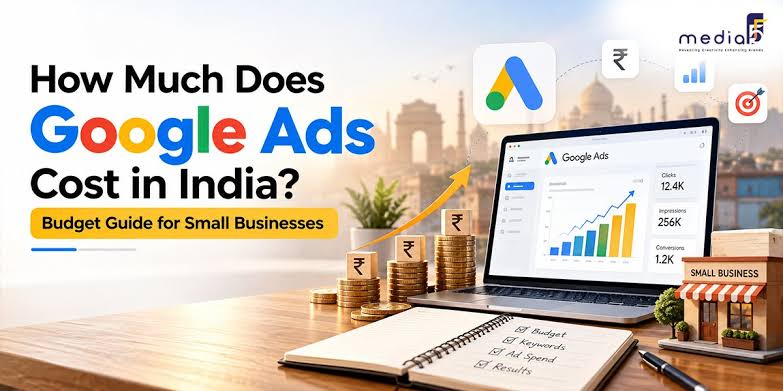
Google Ads Cost in Guntur: How Much Should Your Business Spend? Are you wondering how much online advertising will cost your business? Understanding the Google Ads cost in Guntur can help you plan a realistic marketing budget and reach potential customers more effectively. Your actual expenses depend on keyword competition, campaign settings, target locations, and advertising goals. With a clear strategy, local businesses can monitor spending, measure enquiries, and make informed decisions about their advertising investment. For local businesses, Google advertising can provide an opportunity to reach people searching for relevant products and services. However, spending more does not automatically mean generating more customers. A well-planned campaign should focus on relevant traffic, qualified enquiries, and measurable results. In this guide, KESA Digital Marketing Services explains the factors that influence Google Ads pricing and how businesses can plan their advertising budgets more effectively. What Is the Google Ads Cost in Guntur for Local Businesses? The Google Ads cost in Guntur varies depending on your industry, advertising objectives, and competition for the keywords you target. Google Ads allows advertisers to control their budgets and select bidding strategies that match their campaign goals. Before starting a campaign, separate your expected expenses into three areas: Understanding these expenses helps you plan your marketing budget without confusing advertising costs with professional service fees. How Is Google Ads Cost in Guntur Calculated? In pay-per-click advertising, you generally pay when someone clicks your ad. Your actual cost per click depends on the advertising auction, competition, bidding, and other factors. For example, if your average cost per click is ₹20 and you receive 100 clicks, your illustrative advertising spend is ₹2,000. This is a mathematical example, not a confirmed average for Guntur. The number of clicks alone does not determine campaign success. You should also measure how many visitors contact your business, submit enquiry forms, or make purchases. What Is a Suitable Google Ads Budget for Small Businesses? Choosing an appropriate budget begins with understanding your customers and the value of each potential sale. A local service provider may have different advertising needs from a retailer or educational institution. You could test a limited budget first and increase spending when your campaign generates relevant enquiries at a cost your business can support. Illustrative monthly budget Possible campaign approach ₹3,000–₹5,000 Test a narrow set of relevant keywords ₹6,000–₹10,000 Compare selected keywords and advertisements ₹10,000–₹15,000 Gather more data from a focused campaign ₹15,000 or more Consider expansion when results justify it These amounts are planning examples, not verified Guntur market rates or promises of results. Management fees and other expenses are additional. How Can You Set a Google Ads Budget That Makes Sense? Start by estimating how much your business can reasonably spend to acquire a customer. Consider your profit margins, average order value, enquiry-to-sale rate, and the quality of leads you receive. Review the results before increasing your daily budget. If your advertisements generate clicks but few useful enquiries, investigate your keywords, offer, and landing page before spending more. Which Factors Influence Google Ads Pricing in Guntur? Several variables can affect your advertising expenses. Understanding them can help you make better campaign decisions. Does Keyword Competition Affect Google Ads Cost in Guntur? Yes. Keywords that attract many advertisers may have greater competition than more specific searches. However, costs vary, and a highly relevant keyword can be valuable even if it receives fewer searches. Research search terms that match your services and the needs of your potential customers. For local campaigns, include location-specific phrases when they reflect genuine search intent. How Do Location Targeting and Industry Affect Advertising Costs? Businesses serving customers in Guntur should choose locations based on their actual service area. Depending on your business, you may also target Tenali, Vijayawada, or other nearby areas. Your industry also matters because customer value, competition, and conversion rates differ. Select your targeting based on where you can serve customers effectively rather than expanding your reach without a clear reason. Can Landing Page Quality Improve Campaign Performance? A relevant landing page helps visitors understand your service and decide what to do next. It should load well on mobile devices, explain your offer clearly, and provide an easy way to contact you. Your advertisement and landing page should deliver a consistent message. This helps visitors find the information they expected when they clicked your ad. How Can You Reduce Wasted Google Ads Spending? Effective campaign management focuses on attracting the right visitors instead of simply increasing traffic. Use Relevant Keywords and Negative Keywords Choose keywords that closely match your services. Review your search terms report to identify unrelated searches and add suitable negative keywords where necessary. This can help reduce spending on clicks that are unlikely to produce useful business enquiries. Track Conversions Instead of Clicks Alone Set up conversion tracking for meaningful actions such as qualified phone calls, enquiry forms, and online purchases. These measurements help you evaluate whether your campaign is contributing to your business goals. Review Campaign Performance Regularly Monitor advertising spend, cost per conversion, conversion rates, and lead quality. Make adjustments based on the available data rather than assuming that every click has equal value. Should You Choose Google Ads or SEO for Your Business? Google Ads and search engine optimization serve different purposes. Paid advertising can help your business appear in eligible sponsored placements, while SEO aims to improve visibility in organic search results. Google Ads may be suitable for testing offers and attracting paid traffic. SEO can support longer-term organic visibility through useful content, technical improvements, and relevant website information. Many businesses use both approaches as part of a broader digital marketing strategy. The best combination depends on your objectives, available budget, competition, and time frame. How Can Google Ads Services in Guntur Help Your Business? Professional campaign management can help you organize keywords, create relevant advertisements, configure targeting, and measure performance. KESA Digital Marketing Services helps businesses plan campaigns around their marketing objectives. Before launching a campaign, we recommend defining the target audience, advertising
Google Ads Services in Guntur to Grow Your Business Online

What Are Google Ads Services in Guntur? Are you spending time promoting your business but still struggling to get enough customer enquiries? With the right Google Ads services in Guntur, you can put your business in front of people who are actively searching for the products or services you offer. Imagine someone in Guntur searching Google for a digital marketing agency, a website designer, or a local service provider. A relevant advertisement gives your business an opportunity to appear when that potential customer is looking for a solution. At KESA Digital Marketing Services, we help businesses plan and manage Google Ads campaigns with a clear focus on targeting, budget management, and measurable results. Whether you want more phone calls, website enquiries, or qualified leads, a well-planned advertising strategy can help you reach the right audience. Benefits of Google Ads Management in Guntur Google Ads is Google’s online advertising platform. It allows businesses to promote their products and services through search advertisements, YouTube videos, display advertisements, and other eligible placements. For local businesses, Google Ads can be a practical way to reach people searching for relevant services in and around Guntur. For example, a business owner looking for online promotion might search for “Google Ads expert in Guntur.” A properly targeted search campaign can help a relevant advertiser appear for that query, depending on the campaign settings, competition, budget, and ad eligibility. Professional Google Ads management involves more than creating an advertisement. It includes researching keywords, choosing the right campaign type, writing relevant ad copy, monitoring spending, and measuring conversions. Why Do Local Businesses Need Google Ads Services in Guntur? Many customers use Google to compare businesses before making a purchase or contacting a service provider. If your business is not visible when relevant searches happen, you could miss opportunities to connect with potential customers. Google Ads can help your business: Advertising alone cannot guarantee new customers. Your offer, pricing, website, competition, and follow-up process also influence whether an enquiry turns into a sale. Benefits of Google Ads Management in Guntur Every business has different marketing goals. A local service provider may want more phone calls, while an online store may focus on purchases. The benefit of Google Ads depends on choosing the right objective and measuring the outcome. Reach People Who Are Already Searching Google Search Ads can help your business appear when people search for relevant products or services. This makes search advertising useful for reaching potential customers who have already expressed an interest through their search queries. Generate More Relevant Enquiries A campaign can direct visitors to a service page, contact form, or phone number. By targeting suitable keywords and providing clear information, you can encourage people who are genuinely interested in your services to contact your business. Target Customers in Your Service Area If you serve customers in Guntur, you can configure location targeting around your actual service area. Depending on your business coverage, you might also consider Tenali, Vijayawada, or other nearby locations. Start with the locations you can serve effectively. Expand your targeting when campaign performance and business capacity support it. Manage Your Advertising Budget Google Ads allows you to set campaign budgets and select bidding strategies. Regular monitoring helps you understand where your money is being spent and whether the campaign is generating useful results. Track Performance More Clearly You can measure impressions, clicks, click-through rate, conversions, and cost per conversion. For lead generation, it is also important to assess lead quality rather than judging success by clicks alone. Our Google Ads Services in Guntur At KESA Digital Marketing Services, we focus on creating campaigns that align with your business objectives. Here are the services we offer to support your online advertising efforts. Google Search Ads Management Search campaigns help businesses reach people who are searching for relevant services on Google. We can assist with keyword research, campaign structure, ad copy, negative keywords, and performance monitoring. Google Display Ads Display advertising can help introduce your business to relevant audiences across eligible websites and apps. It can support brand awareness and, where appropriate, remarketing campaigns. YouTube Video Advertising Video ads can help you demonstrate a product, explain a service, or introduce your brand. YouTube advertising may be suitable for businesses that want to reach audiences through engaging video content. Google Ads Lead Generation If your goal is to receive customer enquiries, we can help plan campaigns around actions such as completed contact forms, phone calls, and other relevant conversions. The aim is to attract potential customers who are more likely to be interested in your offer—not simply to increase website traffic. Keyword Research and Negative Keywords Choosing relevant keywords is an important part of campaign planning. We research terms related to your services and identify irrelevant searches that may waste advertising spend. For example, a business offering paid Google Ads management may want to distinguish commercial service searches from searches for free training or jobs. Conversion Tracking and Campaign Optimization We help identify the actions that matter to your business and use available campaign data to evaluate performance. Depending on your objectives, optimization may include reviewing search terms, testing ad copy, adjusting targeting, or improving landing pages. How to Create a Google Ads Campaign Step by Step If you want to advertise your business on Google, start with a simple plan. These steps explain how a campaign can be built and managed. Step 1: Decide What You Want to Achieve Before creating your campaign, decide what success means for your business. Your goal could be to receive more phone calls, generate website enquiries, increase online sales, or promote a new service. For example, if you provide digital marketing services in Guntur, qualified consultation requests may be a more useful goal than website visits alone. Step 2: Research the Right Keywords Think about what your customers type into Google when they need your service. Potential keywords include: Use Google Keyword Planner and other relevant research tools to explore search terms, competition, and estimated advertising costs.
Why Is My Website Not Ranking on Google
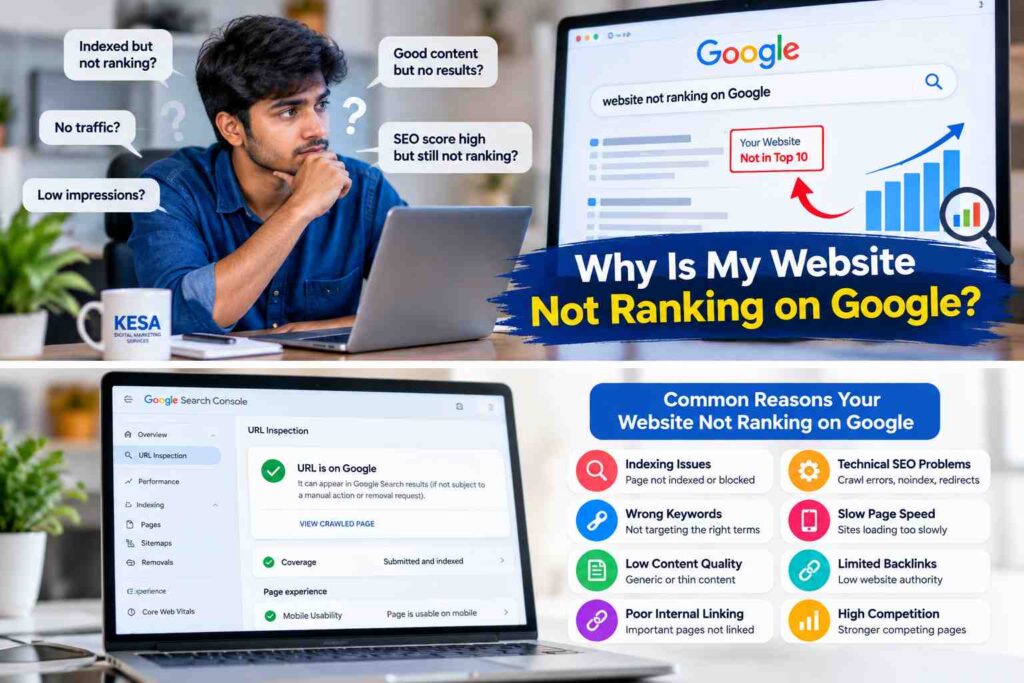
Have you published a website or blog but still cannot find it on Google? A website not ranking on Google can be frustrating, especially when you have invested time in creating content and building your online presence. Several issues can affect search visibility, including indexing problems, keyword selection, technical SEO errors, weak content, and poor internal linking. The good news is that you can investigate these issues using Google Search Console and practical search engine optimization techniques. This guide explains the common reasons your website may not appear in search results and how to address them step by step. Why Is Your Website Not Ranking on Google? Your website may not rank because Google has not indexed the page, your content does not match the user’s search intent, or competing pages provide more useful information. Technical problems and limited website authority can also affect performance. First, identify whether your page is missing from Google entirely or appearing at a lower position than expected. These are different problems and require different solutions. 1. Check Whether Your Website Is Indexed by Google Indexing is an important part of SEO. Google discovers pages through crawling, processes their content, and may add eligible pages to its index. A page that is not indexed generally cannot appear in ordinary Google Search results. Open Google Search Console and use the URL Inspection tool to check your page. Review the indexing status and any reported issues. If the page is eligible for indexing but has not been indexed, Website not ranking on Google SEO analysis you can request indexing after checking that the content is accessible and useful. Also review your XML sitemap, robots.txt file, and any accidental noindex directives. Submitting a sitemap or requesting indexing does not guarantee that Google will index the page. 2. Target the Right Keywords Choosing the wrong keywords can make it difficult to attract relevant visitors. Your content should match the phrases your intended audience actually uses when searching online. For example, a business serving local customers may target a phrase such as “digital marketing services in Guntur” rather than relying only on a broad term such as “digital marketing.” Use keyword research to understand search intent, competition, and related questions. Include your primary keyword naturally in the page title, main heading, introduction, and relevant subheadings. Learn how SEO works to understand how search engines discover, index, and rank pages. Avoid repeating the same keyword excessively. Write naturally and cover the topic thoroughly instead of trying to achieve an arbitrary keyword density. 3. Improve Technical SEO Website not ranking on Google SEO analysis Technical SEO helps search engines access, understand, and process your website. Even useful content can face visibility problems when important technical settings are incorrect. Review the following areas during your website SEO audit: Fix the issues that affect your important pages first. Technical improvements can remove obstacles, but they do not guarantee higher rankings on their own. 4. Create Helpful and Original Content Content quality plays an important role in SEO. If your article provides only a brief or generic explanation, readers may not find enough information to solve their problems. Create content that answers the main question clearly and provides practical steps, relevant examples, and useful explanations. Use your own analysis and experience wherever possible. For example, instead of simply stating that keyword research is important, explain how a business owner can compare search terms, identify user intent, and select an appropriate keyword for a service page. Avoid copying competitor articles or rewriting existing content without adding value. Originality means contributing useful information, not merely changing a few words from another source. 5. Understand Search Intent Search intent is the reason behind a search query. Someone searching for “what is SEO” generally wants an explanation, while someone searching for “SEO services in Guntur” may be looking for a service provider. Your page should satisfy the purpose behind the keyword. Before publishing, review the types of pages appearing for your target query. Determine whether searchers expect a tutorial, comparison, local service page, or product page. Then create content that meets that need more effectively. Do not copy competing pages. Use your research to understand the topic and provide a distinct, helpful answer. 6. Improve Internal Linking Internal links connect one page on your website to another. They help visitors discover related content and help search engines understand how your pages relate to each other. For example, if you have published a beginner’s guide titled “What Is SEO?”, you can link to it from a related article about website ranking problems. You can also connect relevant blog posts to your service pages where the link genuinely helps readers. Use descriptive anchor text that explains what the destination page covers. Avoid adding irrelevant links or forcing the same keyword into every anchor text. 7. Build Relevant Backlinks Naturally Backlinks are links from other websites to your pages. Relevant, editorially earned links can help people discover your content and provide useful context about your website. Focus on creating resources that other website owners may want to reference. You can also contribute useful guest articles, participate in relevant professional communities, and build relationships within your industry. Avoid buying large numbers of low-quality links or creating repetitive links solely to manipulate rankings. Prioritize relevance, editorial quality, and genuine value. 8. Optimize Your Website for Mobile Devices Many people browse websites using smartphones. If your website is difficult to read or navigate on a mobile screen, visitors may struggle to use it. Test your important pages on different screen sizes. Check whether headings wrap properly, buttons are easy to tap, images fit the screen, and navigation works correctly. Also review loading performance and layout stability. Google’s Core Web Vitals include Largest Contentful Paint (LCP), Interaction to Next Paint (INP), and Cumulative Layout Shift (CLS). Improving these areas supports a better user experience, although good performance metrics alone do not guarantee top search positions. 9. Check Your Website’s Google Search Console Performance Google Search